
Learn how to use the Feast + West website here. Find recipes, save your favorites, sign up for the newsletter and get the most out of every visit.

Welcome to Feast + West! I’m so glad you’re here.
If you’re new around here, this is your guide to finding your way around the site. Feast + West is your go-to spot for drink recipes — from classic cocktails to creative seasonal sips and mocktails — plus the occasional bar snack or appetizer to go along with them.
Whether you’re hunting for a specific spirit, planning drinks for a party or just browsing for something new to shake up this weekend, here’s everything you need to know to find what you’re looking for.

Finding a recipe
The site is easy to navigate when you’re looking for a cocktail recipe. You can start here, or check out these ways to find what you’re looking for:
- Homepage: My latest cocktail creations are right at the top, followed by seasonal cocktails, popular posts and resources to help you behind the bar.
- Navigation menus: The menus at the top are easy to spot on desktop. On mobile, tap the three lines in the top left corner to open the menu.
- Search bar: Look for the magnifying glass at the top of the site. Click it and type in what you’re looking for — simpler searches work best (try “margarita” rather than “margarita with lime”). On mobile, the magnifying glass is in the top right.
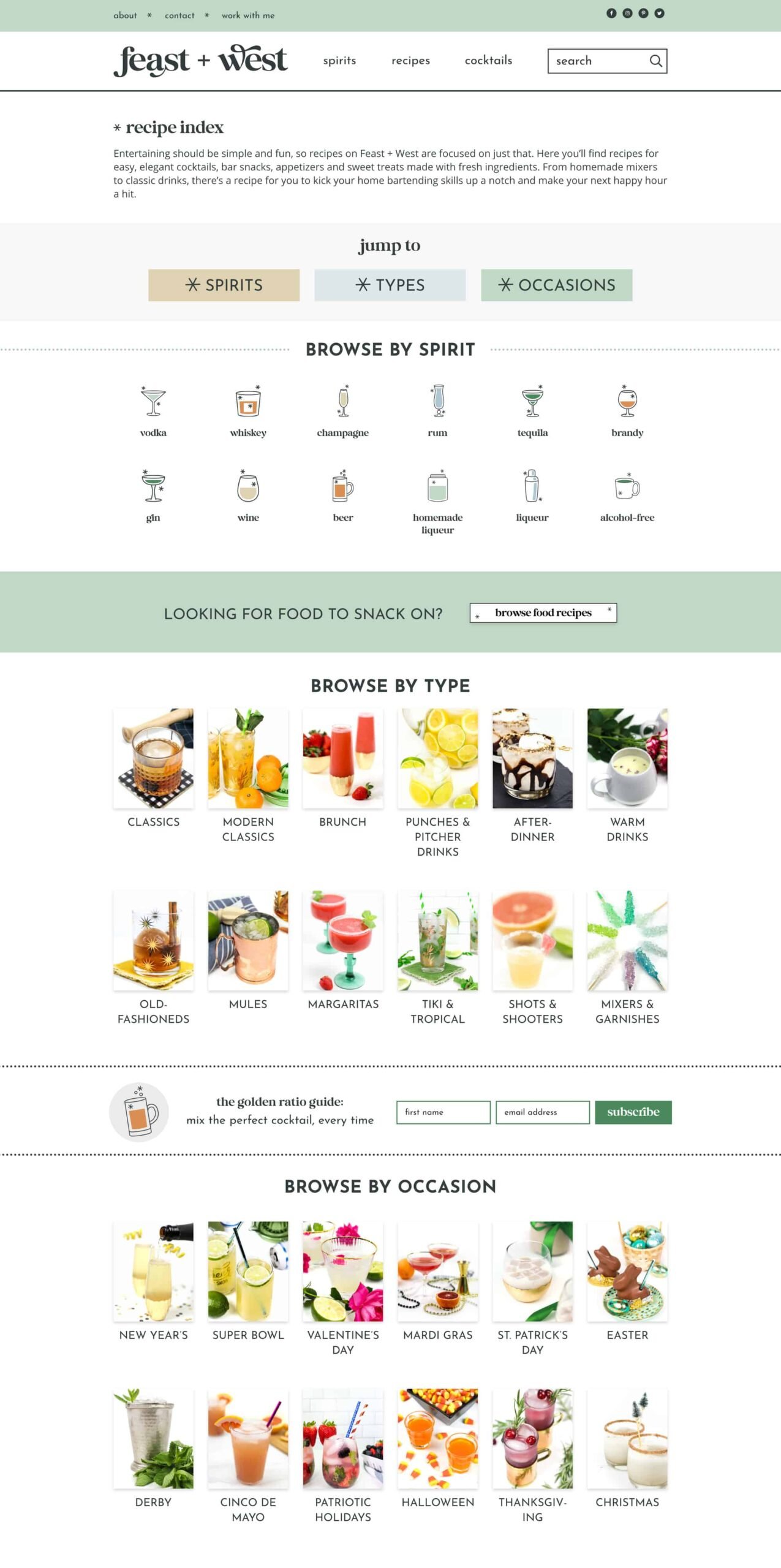
- Recipe index: Hop over to the recipe index, to browse recipes sorted by spirit, cocktail type and occasion. Here’s what it looks like:
Can’t find what you’re looking for?
If you can’t find a recipe using the search bar or recipe index, try searching in Google or another search engine — just add “Feast and West” to your search, like “old fashioned cocktail Feast and West.”
And if you’re looking for something I don’t make, I’m always happy to help point you in the right direction. Food bloggers are incredibly well-connected, and chances are I know a creator who makes exactly what you’re looking for. Just send me an email or leave a comment and I’ll do my best to help!
Never miss a new recipe
There are several ways to keep up with the latest recipes I’m sharing.
Email is my favorite way to share recipes with my readers. There are opportunities all over the site to sign up for my newsletter. You can sign up right here:
I send emails about cocktails, mocktails, coffee drinks, hosting tips and more. But not everyone wants all of it, and that’s totally fine. You can update your preferences anytime — look for the link in the footer of every email. Here’s what you can choose from — select the weekly recipe digest if you want every new recipe:
- Cocktails & home bar (alcoholic)
- Mocktails & zero-proof (non-alcoholic)
- Home barista drinks (coffee & tea)
- Party menus & hosting (food & drink recipes)
- Weekly recipe digest (all new recipes)
Social media
If you’re on Facebook or Instagram, you can follow me there. On both platforms, I post about the latest, trending and seasonal recipes multiple times a week. Be sure to toggle on notifications so you find out about everything that I post.
Save your favorites
Planning a party or just collecting drinks to try later? There are a few ways you can save your favorite recipes to make later.
Slickstream
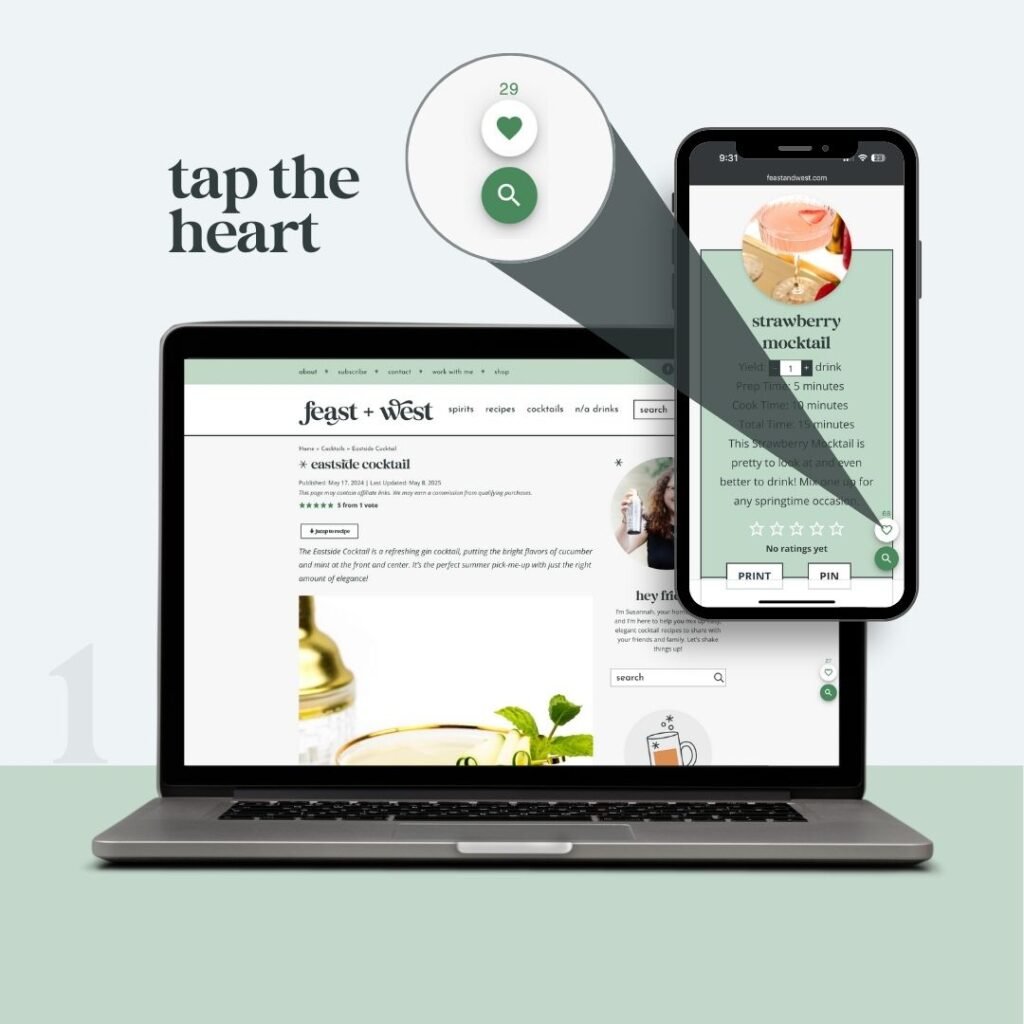
The little green heart 💚 in the lower-right corner lets you save recipes you love so you can find them fast! Head to this guide where I explain step-by-step how it works, help you troubleshoot issues and share my favorite tips and tricks.
Save any recipe you want to try by clicking the green heart in the corner of the screen. Once you create an account, you can log in to access your favorites anytime. Learn more.
You can have any recipe emailed right to your inbox. Look for this form that says “save this post” on any recipe, and enter your email address. My website will automatically email a link to the recipe for you to access any time you need it.
Why a link and not the full recipe? I’m always updating and retesting recipes, so a link ensures you always have the latest version. Here’s what it looks like:

For those on Pinterest, you can follow me to see my pins in your feed. You can pin any recipe to your boards — look for the Pinterest button on blog posts and in recipe cards. I also recommend Pinterest’s browser extension which lets you save links from anywhere on the internet. They also have an app that’s easy to use — download it from the Apple App Store or Google Play.
Facebook & Instagram
When I share a recipe on Instagram or Facebook, I’ll often include a keyword in the post — just drop that word in the comments and my account will automatically send you a direct message with the link. Both platforms also let you save posts to your account, but the comment trick is faster since the link comes straight to your inbox.
Making a recipe
Here are a few tips that will help you navigate the recipes on my site.
The “Jump to Recipe” button
When you arrive on a recipe page, there is a button at the top that says “Jump to Recipe.” Tapping this will take you directly to the full printable recipe card, which is usually at the bottom of the blog post.
There, you can print or save the recipe, or leave it open while you cook. I always recommend reading through the post first though — you’ll find tips, FAQs and substitutions that aren’t in the recipe card, and it often answers questions before you even have to ask! I’ve published nearly 1,000 recipes, and the latest and updated ones include in-depth instructions, tricks and suggestions for making and serving.

The recipe card
The recipe card is where the magic happens. This is the part of a post that you are looking for if you want to make it. It has the servings, ingredients, instructions and nutrition information. Here are some tips and tricks for using the recipe card:
- Servings: There are +/- buttons at the top of the recipe card where you can adjust the number of servings, and it will update the amounts in the ingredients list. This is great for putting together a larger batch or halving a recipe, but be sure to check the blog post for tips in case there is a specific order of steps or special timing to consider.
- Pin button: Click this to save the recipe directly to your Pinterest boards.
- Print button: See the “Printing a recipe” section below.
- Star ratings: You can click the stars to add your own rating — and see how others have rated it too.
- Units: At the bottom of the ingredients list, you can switch between US Customary and Metric measurements. (I’m still working on adding this to older recipes, so it may not be available on every post.)
- Substitutions & storage: Check the Notes section and blog post for ingredient substitutions and swaps and storage instructions — I include these in the FAQs or tips sections. If you don’t see an answer to your question, leave a comment and I’ll do my best to help!
- Video: Some recipes include a video in the recipe card showing how to make the drink. If there’s a video, you’ll find it right in the card — just press play.
- Recommended products & ingredients: The recipe card includes links to products that I recommend. These are often affiliate links — if you click one and buy something, I may earn a small commission at no cost to you, which helps keep this site running.
- Share it! If you post the recipe on Instagram, tag it with #feastandwestrecipes or tag me @feastandwest. It always makes my day!
Printing a recipe
In the recipe card, click the Print button to open a print dialog on your device — this works much better than the print button in your browser, which will try to print the entire page.
A pop-up may ask you to add your email address to verify you’re not a bot. You’ll always have the option to join the email list — but it’s never required. If you have already entered your email address on another device, you may be asked again.
On the print page, you can toggle on and off information that you want to print. This helps save paper — you can turn off the nutrition info, for example, if you don’t need it.

Rating a recipe
If you make a recipe, I’d love to hear how it went. Look for the 5 stars in the recipe box at the bottom and leave a rating. Ratings help search engines and AI tools know a recipe is worth recommending, and they help me know what kinds of recipes you love — so if you enjoyed it, please take a second to leave one!
A note about ads
Feast + West is my full-time job, and visits to this site are genuinely how I pay my bills. Here’s how it works: When you visit a recipe, you may see ads or affiliate links. Advertisers pay me to showcase their products alongside my content, and I earn a small commission when you click an affiliate link and make a purchase.
A lot goes into each recipe — I create, test, style, photograph and write every one, and my small team helps me keep it all running. Running a website isn’t free either, so these visits and clicks are what keep the site alive and the recipes coming.
Think of it like commercials during your favorite TV show or sponsored pages in a magazine — it’s just how free content on the internet works! If ads bother you, you’re welcome to use an ad blocker. I’d rather you use one than not visit at all.
Questions & comments
If you have a question about a recipe, the best place to ask is in the comments. That way, other readers making the same recipe can see the answer too. You can always send me an email to susannah (at) feastandwest (dot) com, too.
Troubleshooting & accessibility
If something on the site isn’t working as expected, here are a few things to try:
- Slickstream issues: Slickstream indexes the site several times a day, but it can take a few hours for new recipes to appear. If you’ve just visited a brand new recipe and don’t see the green heart yet, check back later. If it’s still missing after a day, feel free to email me at susannah (at) feastandwest (dot) com and I’ll look into it.
- A bad or intrusive ad: I work with an ad network and occasionally an ad slips through that is disruptive or inappropriate. If you see one, please email me at susannah (at) feastandwest (dot) com with a screenshot if you can — I can report it to my network.
- Slow website or page isn’t loading: If the site feels slow or isn’t displaying correctly, first make sure your browser and operating system are up to date. On mobile, try refreshing by pulling down from the top of the screen or closing and reopening your browser app. On desktop, try a hard refresh (Ctrl+Shift+R on PC, Cmd+Shift+R on Mac) or clearing your browser cache.
- Accessibility: If you use a screen reader or have other accessibility needs and run into any issues, please let me know and I’ll do my best to help. I’m still working through adding alt text to older posts — if you need a description of a specific image, just email me.
- Anything else: Feel free to reach out and I’ll do my best to help!
Where is the travel content?
If you’ve been here a while, you might remember I used to write more about design and travel. But my drinks and party food recipes are what my readers love, and my analytics show it time and time again.
These days, you’ll see a focus on drinks with the occasional bar snack, appetizer or dessert in the mix. I’m working on moving the travel content to a new home — coming soon in summer 2026!
Website credits
My website was designed by Madison at Grace + Vine Studios. (She shared a nice write-up about the Feast + West website launch!) Food bloggers: She’s got a waitlist for new website designs which I highly recommend joining ASAP.


